

What Are Advanced Variables?
Advanced Variables extend Phonely’s standard variable system by allowing you to define exactly how a value should be formatted, validated, and stored. Like all variables in Phonely, they:- Capture information from the caller
- Persist throughout the call
- Can be reused in other blocks, integrations, and post-call actions
Why Advanced Variables Matter
Some information cannot afford to be “close enough.” Examples include:- Vehicle Identification Numbers (VINs)
- License or policy numbers
- Dates in strict formats (e.g. YYYY-MM-DD)
- Reference IDs required by downstream systems
- Any value that must match a precise schema before being sent to an API or CRM
Where to Use them
Advanced variables are configured inside your flow blocks (such as Talk, Ask Exactly, or Collect), within the Agent Design interface. They behave like any other variable in the system:- They can be referenced using
@variable_name - They can be required or optional
- They can be confirmed with the caller
- They appear in post-call data, webhooks, and integrations
Example: Capturing a VIN Number Correctly
Let’s walk through a common real-world use case: collecting a vehicle VIN. A VIN must:- Be exactly 17 characters
- Contain only letters and numbers
- Have no spaces or special characters
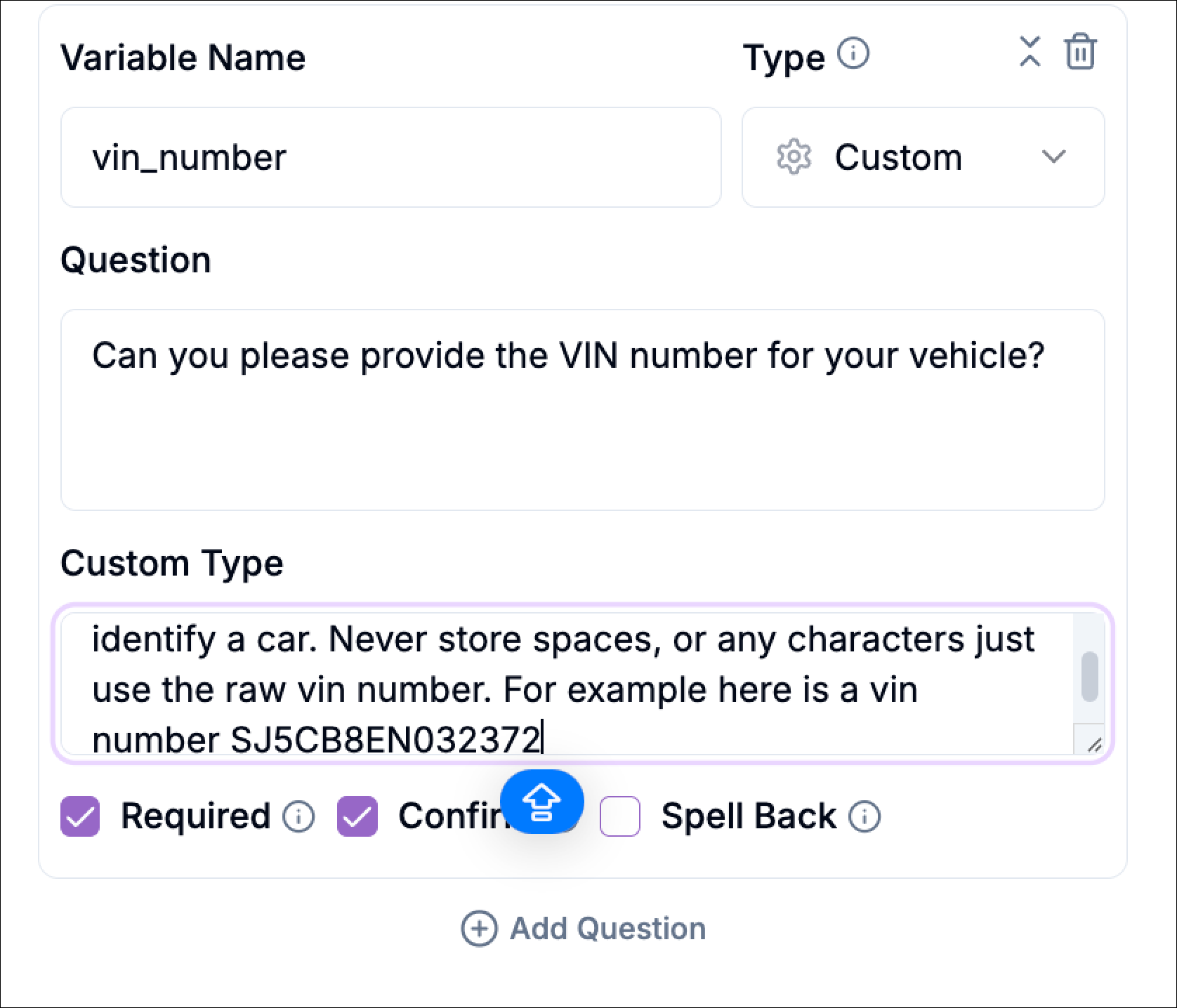
Create the Variable
In the block configuration:
- Create a new variable (for example,
vehicle_vin) - Choose the variable type as custom.
Ask for the Information in the Prompt
Start by updating your prompt in the relevant block (for example, a Talk block) to ask for the information naturally.For example:
“Can you please provide the VIN number for your vehicle?”At this stage, you are only guiding the conversation. The formatting logic comes next.
Define a Custom Format
This allows you to describe, in plain language, exactly how the value should look. Phonely’s AI uses this description to extract and normalize the value correctly from natural speech.For a VIN, your custom description might explain:
- That the value is a 17-character alphanumeric identifier
- That it should not contain spaces
- That it should not include special characters
- That only the raw VIN should be stored
Mark the Variable as Required (Optional)
If the flow cannot proceed without this information, you can mark the variable as required.When a variable is required:
- The agent will not move forward until a valid value is captured
- The AI will naturally guide the caller to provide usable input
- The flow remains clean without extra conditional logic
Confirm the Value with the Caller
Advanced variables support automatic confirmation, which is highly recommended for sensitive or critical data.When confirmation is enabled:
- The agent repeats the captured value back to the caller
- The caller can approve or correct it
- The variable is only finalized once confirmed
Using Advanced Variables Elsewhere in the Flow
Once captured, advanced variables behave exactly like any other variable in Phonely. You can:- Reference them in later prompts (
@vehicle_vin) - Pass them into API Request blocks
- Store them in CRMs or databases
- Include them in post-call emails or summaries
- Use them in routing or decision logic
When You Should Use Advanced Variables
Use advanced variables when:- Data must match a specific format
- Downstream systems are strict about inputs
- You want to avoid manual cleanup or retries
- Accuracy matters more than flexibility