> ## Documentation Index
> Fetch the complete documentation index at: https://docs.phonely.ai/llms.txt
> Use this file to discover all available pages before exploring further.
# Ask Exactly
> Collect specific, structured information from callers with precise validation and natural conversation flow
Use Ask Exactly when you need the caller to answer one specific question at a precise moment in the flow. If you want the agent ask questions in a conversational manner and have a back & forth conversation, use the [Talk Block](/blocks/flow-blocks/talk).
Note: The Ask Exactly block is restricted to admin users only. If you don’t see it listed, your account may not have the required permissions
## What it does
The Ask Exactly block (also referred to as the "Question Block" in some contexts) is a core component of creating workflows in Phonely. However, they should be used sparingly. Ask Exactly blocks are specifically designed to ask a very precise question at a particular point in the conversation, where a specific piece of information is absolutely required.
Unlike traditional IVR systems, Phonely adapts to conversational nuances, ensuring a natural flow even when inputs are imperfect. However, if you are looking to ask multiple questions or have a back and forth conversation, the Ask Exactly block should not be used.
 ## When to use it
It's important to understand the role of the Ask Exactly block in your Phonely workflow:
* Use it when you absolutely require specific information at a given point in the conversation, and you need to ensure that information is explicitly asked for.
* Don't use it very often for general conversational flow. Overuse of the Ask Exactly Block can make the conversation rigid and feel like a traditional IVR (Interactive Voice Response) system, which can frustrate callers.
## Key Features
**Specific Question Focus** - Ensures a particular piece of information is requested and captured.
**Humanization** - Personalize conversations by incorporating the user's name and other details using variables from previous blocks.
**Conversational Style** - Phonely automatically adjusts the tone and flow to feel more human, avoiding a robotic experience, even within its rigid structure.
**Adaptable to Nuance** - The block is designed to handle conversational variations, ensuring a natural flow even when user inputs aren't perfect, within the confines of the specific question.
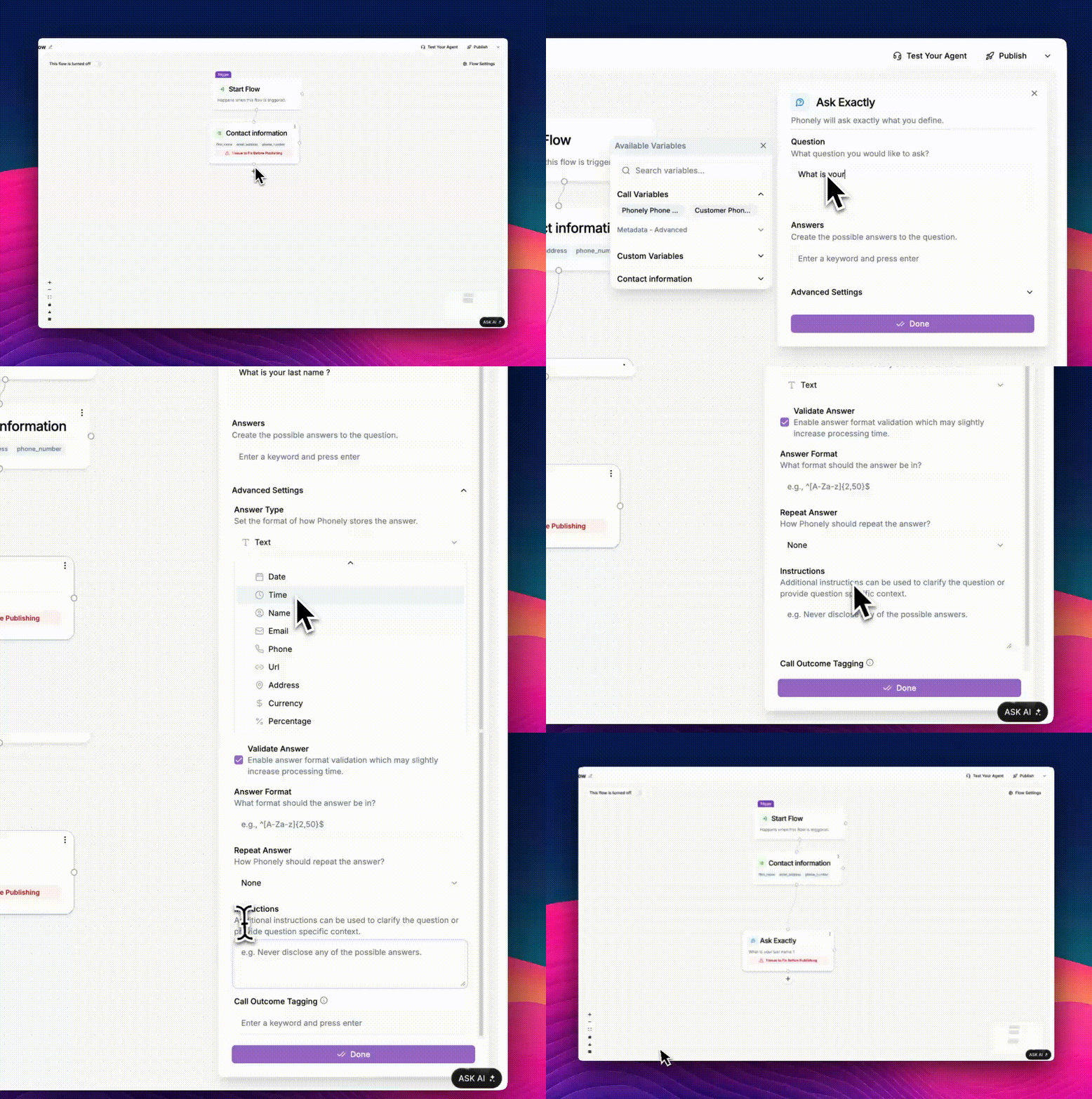
## How to add an Ask Exactly block
This is usually below the Start Flow block, or any existing block which you would like to add your Ask Exactly block below.
You'll have the option to rename the block for clarity within your workflow (e.g., "Confirmation").
You can rename this block to whatever name is more appropriate to your context.
A sidebar will appear where you can input the question details. For example: "Can I get your full name, please?"
You can reference previously collected information (store as variables) directly in your question. For instance, if a previous block asked for an address, you could phrase a confirmation question like: "Just to confirm, you said your address is \[address variable]? Have you been here before?"
## Advanced Options
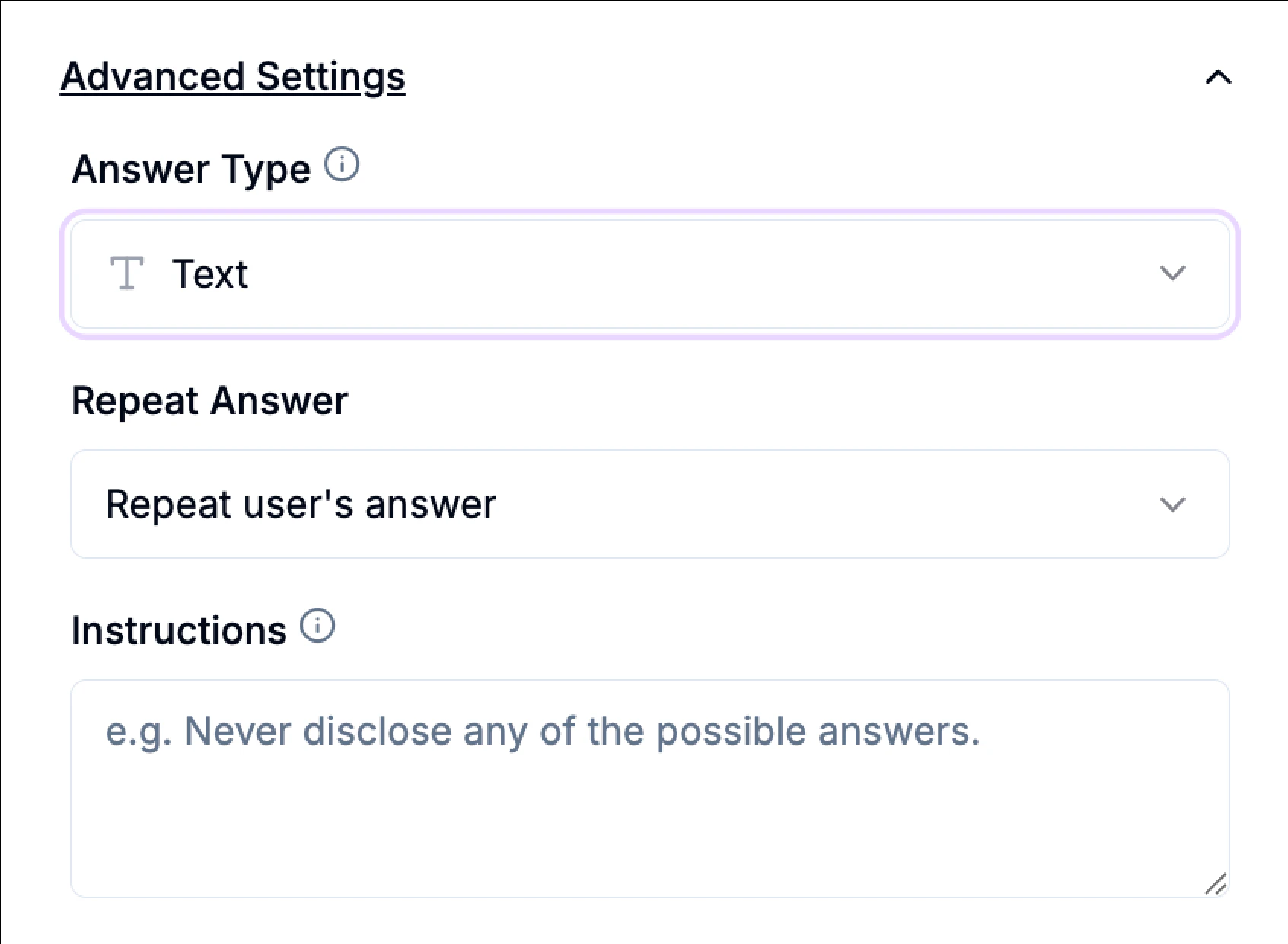
**Set Answer Type** - Define how Phonely saves the collected information (e.g., as text, or a specific format like a date, URL, or phone number).
**Validate Answer** - Add an additional prompt to confirm the user's answer, ensuring accuracy.
**Repeat Answer** - Configure the agent to repeat the user's answer back for confirmation (either by repeating the answer itself or spelling it out).
**Additional Prompting Instructions** - Add specific, rigid instructions unique to this question e.g Never disclose any of the possible answers.
## When to use it
It's important to understand the role of the Ask Exactly block in your Phonely workflow:
* Use it when you absolutely require specific information at a given point in the conversation, and you need to ensure that information is explicitly asked for.
* Don't use it very often for general conversational flow. Overuse of the Ask Exactly Block can make the conversation rigid and feel like a traditional IVR (Interactive Voice Response) system, which can frustrate callers.
## Key Features
**Specific Question Focus** - Ensures a particular piece of information is requested and captured.
**Humanization** - Personalize conversations by incorporating the user's name and other details using variables from previous blocks.
**Conversational Style** - Phonely automatically adjusts the tone and flow to feel more human, avoiding a robotic experience, even within its rigid structure.
**Adaptable to Nuance** - The block is designed to handle conversational variations, ensuring a natural flow even when user inputs aren't perfect, within the confines of the specific question.
## How to add an Ask Exactly block
This is usually below the Start Flow block, or any existing block which you would like to add your Ask Exactly block below.
You'll have the option to rename the block for clarity within your workflow (e.g., "Confirmation").
You can rename this block to whatever name is more appropriate to your context.
A sidebar will appear where you can input the question details. For example: "Can I get your full name, please?"
You can reference previously collected information (store as variables) directly in your question. For instance, if a previous block asked for an address, you could phrase a confirmation question like: "Just to confirm, you said your address is \[address variable]? Have you been here before?"
## Advanced Options
**Set Answer Type** - Define how Phonely saves the collected information (e.g., as text, or a specific format like a date, URL, or phone number).
**Validate Answer** - Add an additional prompt to confirm the user's answer, ensuring accuracy.
**Repeat Answer** - Configure the agent to repeat the user's answer back for confirmation (either by repeating the answer itself or spelling it out).
**Additional Prompting Instructions** - Add specific, rigid instructions unique to this question e.g Never disclose any of the possible answers.
 ## Branching Workflows
The Ask Exactly block is crucial for creating dynamic and logical call flows, ensuring the conversation moves towards the desired outcome based on precise answers.
**Creating Branching Workflows** - Based on the specific answers defined in an Ask Exactly Block, you can create branching workflows to handle various tasks, such as:
* **SMS Scheduling**: Enable appointment scheduling via text if the caller confirms a specific date.
* **Phone Scheduling**: Handle scheduling over the phone.
* **Live Person Transfer**: Transfer the call to a live person if a specific answer indicates the need for human intervention.
Phonely can recognize similar responses and perform tasks contextually, just like a human, ensuring the conversation doesn't get stuck and progresses efficiently.
## Analytics
**Call Outcome Tags** - The Ask Exactly Block allows you to use outcome tags, which are crucial for tracking where users drop off in the workflow. This provides better insights into user journeys and areas for optimization.
**Example**: If a caller exits after the "name question," this interaction can be tagged. This tag is visible in your analytics dashboard, providing valuable data on workflow effectiveness and enabling A/B testing.
## Conclusion
The Ask Exactly Block in Phonely is a powerful tool for creating specific, information-gathering steps within your workflows. While it's best reserved for situations where a precise question and answer are absolutely required, leveraging its features like branching workflows, data type selection, and API integration can transform your AI receptionist into a highly efficient and human-like conversational assistant for those key moments.
## Branching Workflows
The Ask Exactly block is crucial for creating dynamic and logical call flows, ensuring the conversation moves towards the desired outcome based on precise answers.
**Creating Branching Workflows** - Based on the specific answers defined in an Ask Exactly Block, you can create branching workflows to handle various tasks, such as:
* **SMS Scheduling**: Enable appointment scheduling via text if the caller confirms a specific date.
* **Phone Scheduling**: Handle scheduling over the phone.
* **Live Person Transfer**: Transfer the call to a live person if a specific answer indicates the need for human intervention.
Phonely can recognize similar responses and perform tasks contextually, just like a human, ensuring the conversation doesn't get stuck and progresses efficiently.
## Analytics
**Call Outcome Tags** - The Ask Exactly Block allows you to use outcome tags, which are crucial for tracking where users drop off in the workflow. This provides better insights into user journeys and areas for optimization.
**Example**: If a caller exits after the "name question," this interaction can be tagged. This tag is visible in your analytics dashboard, providing valuable data on workflow effectiveness and enabling A/B testing.
## Conclusion
The Ask Exactly Block in Phonely is a powerful tool for creating specific, information-gathering steps within your workflows. While it's best reserved for situations where a precise question and answer are absolutely required, leveraging its features like branching workflows, data type selection, and API integration can transform your AI receptionist into a highly efficient and human-like conversational assistant for those key moments.